Monday, July 8, 2019

Normally, when we share or post (tweets) images and content URL from blogger on twitter page, it will not show large image. According to my experience, I found that the blogger template don’t have twitter card. Mostly, free blogger template does not to add twitter card.  The twitter card or twitter card meta tag is the social media meta tag for social network Twitter that it can enable webpage of blogger become a rich object in the social graph. It mean that when you share or post (tweets) images and content from  blogger into twitter, you will see large image like you post direct on twitter. On this guide, i will show you about how to add twitter card on the blogger.
Step 1: backup your template
Before you start to add twitter card, you should backup your current template first. If you do something wrong, you can restore it back.
  • Login your blogger profile
  • Click on Theme
  • Backup/Restore button and click Download theme. It will download your template into computer.

Step 2: go to “Theme” menu then click “Edit HTML”
Step 3: in HTML box, please click Ctrl + F to find word “ </head> “
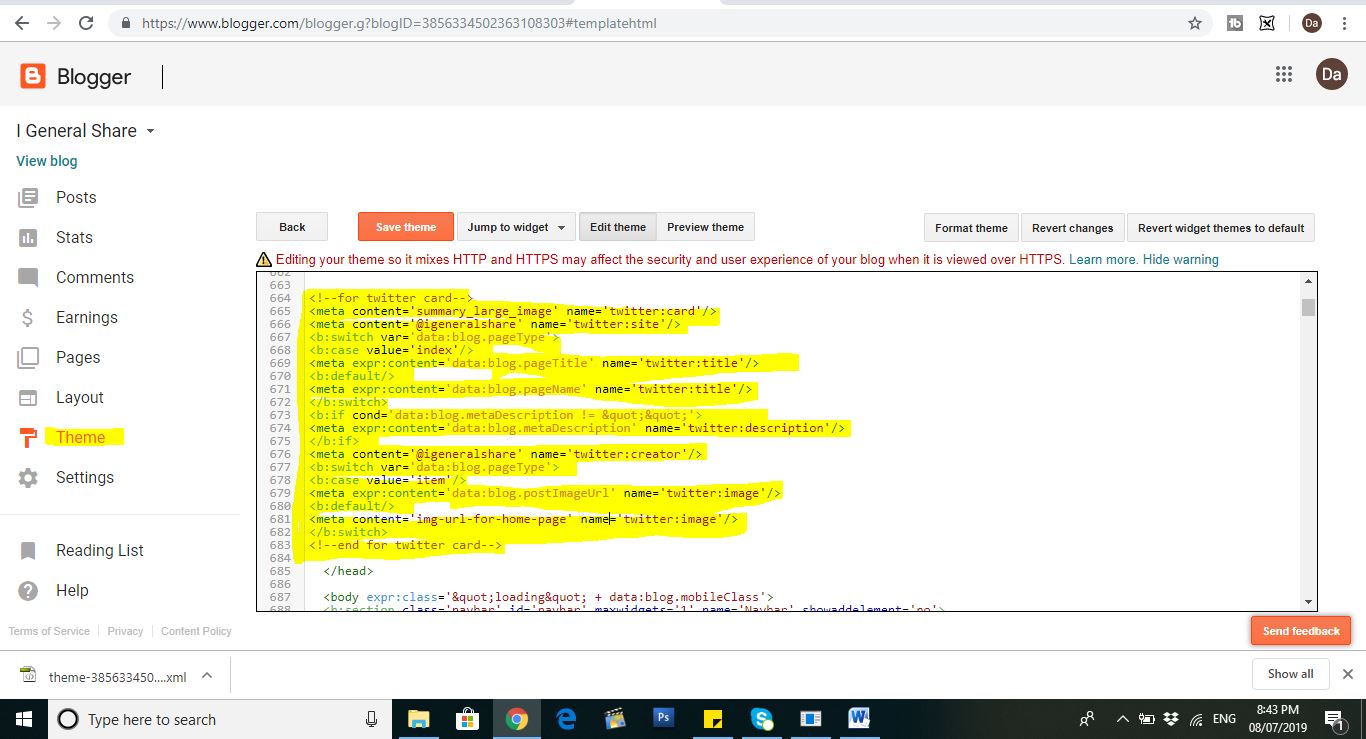
Step 4: please copy below code and past between <head> …..</head>

<!--for twitter card-->
<meta content='summary_large_image' name='twitter:card'/>
<meta content='@your name' name='twitter:site'/>
<b:switch var='data:blog.pageType'>
<b:case value='index'/>
<meta expr:content='data:blog.pageTitle' name='twitter:title'/>
<b:default/>
<meta expr:content='data:blog.pageName' name='twitter:title'/>
</b:switch>
<b:if cond='data:blog.metaDescription != &quot;&quot;'>
<meta expr:content='data:blog.metaDescription' name='twitter:description'/>
</b:if>
<meta content='@your name' name='twitter:creator'/>
<b:switch var='data:blog.pageType'>
<b:case value='item'/>
<meta expr:content='data:blog.postImageUrl' name='twitter:image'/>
<b:default/>
<meta content='img-url-for-home-page' name='twitter:image'/>
</b:switch>
<!--end for twitter card-->

Note: @your name is a name URL of your blog. For example my blogger is https://igeneralshare.blogspot.com/ , so you need to input @igeneralshare.


Step 5: click on “Save theme” button.
Step 6: test your configuring
You can test with this URL https://cards-dev.twitter.com/validator to make your twitter card is working.
  • Click on above link
  • Copy your content URL and past into Card URL box
  • Click on “Preview Card”
  • You will see your content with large image at right hand.

Step 7: after you tested on above URL, you should try to share from your blogger to twitter account. So you can see your article with the large images. It means that other people can see the same you.

One more thing, if you want to change type of twitter card, you can copy or edit Meta tag between <head>………</head>
<meta content='summary' name='twitter:card'/> 

I hope that this guide can help you to share content into twitter with large image. It is very important for blogger to show interest large image. This thing should your requirement.

Friday, June 21, 2019


Actually, it is very difficult when we start to work without experience but we need to try to learn and practice from one day to one day. You will get the good result, if you try to improve your capacity. However, if you want to become expert of graphic designer, you must to start from zero point. You can’t find client or open a company for design immediately because you don’t have skill and experience. You should work on marketing strategies and self-branding to get experience. On this section, we will share some idea to improve capacity to become professional graphic designer.

Improve your skills
The first time, you should try to find school to learn about graphic design skill and you need to complete degree of this skill. You should study some graphic design application or software such as Adobe Photoshop, Adobe InDesign, Adobe Illustrator, Autocat, Affinity Designer, and other graphic design software. But this skill need to careful, endurance, and practice every day and at lease you should know basic of adobe Photoshop, Adobe InDesign, and adobe illustrator.
You really take time from 3 to 6 months to learn basic of these graphic design applications. Also you can find video, e-book, or text on the internet to study more. It has lot of video, e-book, and text that other people share on Youtube or website.

Find experience
When you completed degree with graphic design skill, you still don't have job experience and you don't have any company or client to rent you to design for them. You should find volunteer job or apply CV to other company that they recurred graphic designer.
In these places, you should see about company's strategies to find the client and you can showcase your capacity to get experience.

If you completed to work a volunteer for one or two company, you should apply to other company to exchange experience.
Prepare plan your strategically
You should to create own website by buy domain or free blogger to show beautiful picture that you designed and write your experience or service on this website. Also you should to create unique picture or video that other people like. For example, you start do video about create typography logo and you use your capacity edit it.

You try to make relationship with other company or people and try to show your beautiful picture that you designed then they will know you can design for them.

One more thing, you should create profile on social network such as Facebook, Twitter, Linkin, Instagram, and other social network. You can post or share about your product and service on there. Most of people process their business with social network and get good result.

If you try to share your experience on website or other social network, I believe that you will have client or company call to design for them. At the same time, you should improve your knowledge relate graphic design application refer to client’s requirement.

Thursday, June 20, 2019


Most of people on the world are using social media depends on their like and habit. There are a lot of social media such as Facebook, Twitter, Instagram, Pinterest, Telegram, Line, or What’s app. Almost of the people living on the earth used these social every day and every time by each purpose. Currently, Facebook is very popular for general people. People all area like city or rural have a Facebook account. They always talk about Facebook and using Facebook looks like living nearly.

What is Facebook?
Facebook is a big social media or called social network to connect between people and people on the world to know and visit together. They only have e-mail or phone number that they can register with Facebook but need to fill some info such as First name, last name, e-mail or phone number, password, address, education, website, work etc.
What is purpose of using Facebook?
Most of people are using Facebook with different purpose. Bellow points are some sample point of using the Facebook that almost of people are doing it every day. Let’s go to read together.
  • They share data (text, images, video, and voice), information, knowledge or experience to people that they know.
  • They can create groups, communities, personal pages or business page.
  • There are a lot of member in group and have a lot of information too.
  • They can chat with other people. Facebook allow all to write text or speak with voice and send to other people.
  • They want to comment under picture or video that other people post or share.
  • They share info about their service or business.
  • According to Facebook have other company rent to advertise about service or products of these companies, so some people created page or group to earn money with Facebook.
  • They share their activity daily on the Facebook.
  • They share family images, funny image or video to other people.
  • They want to connect relationship with people around the world. They find new friend on Facebook.
  • They can know about habit, interest, personal life, or education of other people that they know.
  • They use Facebook for debates or comments. They provide some idea about small business or tell about education.
  • They use Facebook for political reasons.
  • They add people into group chat and then send good or bad messages together.
  • They use Facebook to find traffic for their website or Youtube. Actually, they need to share website and youtube if they want to find user to read or watch their contents because Facebook have a lot of user using.
  • They use Facebook to promote and sale products. They create Facebook page and post their product then share to other fiend and people.
  • They think that use Facebook looks like living nearly.
  • They use Facebook to playing game.

According to these purposes list, most of people are wasting time to use Facebook every day but they got a lot of thing from Facebook such as information around the world, knowledge, experience, reduce stress, do business, and traffic.


Monday, December 31, 2018

At the same time, the Facebook is a big social network that it has over billions of active users around the world. Also you can promote your blog content through the Facebook page and you can get good number of traffic for your blog. 


For the Facebook page, it is very easy to create but it is difficult to get number of like on your Facebook page. This is best one method that you can increase number of like on the Facebook page. You can add Facebook page like box on the blogger that it allows all visitors like your Facebook page directly if they want to get other information in the future. The Facebook created Facebook page plugin that it is very easy to promote the Facebook page on the third party website. On this guide, I will share you about How to add The Facebook page plugin on the blogger.

What is the Facebook page plugin?
The Facebook page plugin is a path or function of Facebook that before they know Facebook like box.  It allows you to promote your Facebook page on the third party website. It can display Facebook cover photo, recent page post, and random people like your page etc.
How to add Facebook page plugin on the blogger
Step 1: you must have a Facebook page
Step 2: open this link Facebook page plugin
Step 3: on the Facebook URL, please input address of your Facebook page. For example https://www.facebook.com/Malis63
Step 4: please input number of width in pixel. For example: you want to show your Facebook page with width 250 pixel.
Step 5: please input number of height in pixel. For example: you want to show your Facebook page with height 200 pixel.  But on this guide, I no need to input.
Step 6: if you don’t want to show any content that you posed on the Facebook page, please delete “timeline” on Tabs box.
Step 7: if you choose “Use small header”, it means that you want to use small cover photo.
Step 8: if you choose “Hide cover photo”, it means that you don’t want to show cover photo.
Step 9: if you choose “Show friend’s face”. It means that you want to show random people liked your Facebook page.
Step 10: please click on “Get Code” button
Step 11: it will pop up 1 screen more and keep it a minute to process step 12.


Step 12: login to your blogger profile
Step 13: Go to “Layout” menu
Step 14: click “Add a tadget” at which side that you want to show Facebook page plugin.
Step 15: please choose “HTML/Javascript”
Step 16: please fill “Facebook” on title box
Step 17: please copy code from step 11 and past on content side.
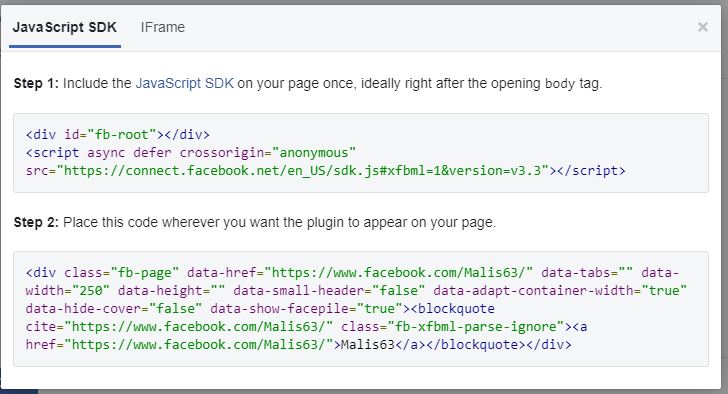
 Include the JavaScript SDK on your page once, ideally right after the opening body tag.
<div id="fb-root"></div>
<script async defer crossorigin="anonymous" src="https://connect.facebook.net/en_US/sdk.js#xfbml=1&version=v3.3"></script>
Place this code wherever you want the plugin to appear on your page.
<div class="fb-page" data-href="https://www.facebook.com/Malis63/" data-tabs="" data-width="250" data-height="" data-small-header="false" data-adapt-container-width="true" data-hide-cover="false" data-show-facepile="true"><blockquote cite="https://www.facebook.com/Malis63/" class="fb-xfbml-parse-ignore"><a href="https://www.facebook.com/Malis63/">Malis63</a></blockquote></div>


Step 18: please click on “Save” button
Step 19: enjoy your Facebook page plugin


Currently, we are living with modern technology that we can read and watch documents or video from the internet. All most video created by other people and they posted or lived with another social network such as Facebook or Twitter etc. However, the Facebook added Live Streams to their page that it allows you live your video on the Facebook page.


Why do you need to Live Stream on the Facebook?
When we Live Stream video on the Facebook, we will get number of visitor, number of like page, and share your video more. One more thing, it is the real time video. You can live about song, activity, sale product online, and other service  of business.
On this article, I will show you “How to Live Stream Video to Facebook page by software OBS Studio”. Let’s go to practice step by step together.

How to Live Stream Video to Facebook page by software OBS Studio
Step 1: before you start to Live Stream video by software OBS, you need to have a Facebook page. It means that you must to create a Facebook page with your profile.
Step 2: download software OBS Studio by link https://obsproject.com/download
Step 3: please install OBS Studio on your computer.
Step 4: login to Facebook page
Step 5: to Live on the Facebook page with OBS Studio, you need to copy stream key from Facebook.
              Please choose “publishing tools “
Step 6: please choose “Video Library”
Step 7: please click on “Live” button
Step 8: find key on “Stream key” box and copy


Step 9: input stream key on OBS Studio
Open OBS studio short cut on the desktop
Go to “Setting”
Go to “Stream”
On the “Stream key” box, please delete old stream key and past new stream key on this box (copy from step 8)
Click OK button
Step 10: back to OBS studio screen and find “Source” box
Step 11: click on “+” then click “Browse”
Step 12: chose “Create new”
Step 13: click OK button
Step 14: choose “Local file” then click on ”Browse”
Step 15: find path of your file and choose file video such as .MP4. On this step, you can set width or height.
Step 16: please click ok button
Step 17: video will show on the OBS Studio screen then please click “Start Streaming”
Step 18: please back to Facebook page that you opened (on step 8)
Step 19: you will see video live from OBS studio
Step 20: if you input everything ready, it mean that your video is online. Please click “Go live” if you want to live video on your Facebook page.

Note:
  • if you want to stop live video on the Facebook page, you just back to OBS studio screen and click on “stop streaming” button. It mean that you disconnect with the Facebook page.
  • Please remember that the next time, if you want to start Live stream on the Facebook page, you need to copy and past stream key on the OBS studio again.

Monday, December 24, 2018

Currently, most of businessmen use internet to communication or show about their product, software, and other service, so they need some application to use such as web application.


What is Web Application?
Web application or web base application is a computer program or called software program that it runs on web browser or internet browser over the internet. Web applications are used a lot of language to design for use on the internet. It use a combination between server side scripts such as JSP, APS or PHP to handle the storage and retrieval of information from client side and client side script such as HTML and Javascript handle to translate information to end user. Client side refers to web browser that work at client’s computer such as Internet explorer, Google Chrome, Mozilla Firefox, Opera, Safari, or Microsoft Edge. Server side refers to service that work at server side such as IIS (Internet Information Service), Apache, and Apache Tomcat. Database supports with web application such as Microsoft access, Microsoft SQL Server, My SQL, and Oracle etc.
We use web application to client or end user do transaction with other company by using online forms and they can show about service, products, or other information to their client. If we use dynamic webpage of web application, it need web server to manage information that request from clients or end user and sometime, web application need database to store data. If we use static webpage of web application, we don’t need web server to process all information from client or end user. Dynamic webpage is the webpage that it allow owner of webpage can edit information later and static webpage is the web page that it is not allow owner of webpage edit information on page later. Web Applications are working with multiple platforms without think about operating system or other devices and it is easy to maintain.

This is some flow of web application:
  • End user input URL or other word on web browser or application’s interface to request to web server over internet.
  • Web server got information from client or end user and it forwards this request to server side.
  • Server side runs service to process client’s request with database.
  • After server side completed process, it will send the result to web server.
  • Web server got result from service of server side then it forward the result to client’s browser.
  • Client’s browser at client side translates data to show on the browser.
Types of web applications by usage are intranet application, internet application, and extranet application.

Intranet application refers to private web application that it can access with LAN (Local Area Network). It means that it use local network and internet to share information in the organization. People around the world can’t see our information.
Internet application refers to public web application that it can access with WAN (Wide Area Network). It means that everyone on the world can see our information. We use it for business operation and people can access it from anywhere over internet.

Friday, October 5, 2018


Actually, if you want to become expert website, you should know about language to create website. The languages for website have a lot such as PHP, ASP, ASP.net, Java, Javascript, CSS, XML, JSP, HTML, C#, VB.net, and other. Databases for website have a lot such as Ms SQL server, My SQL, Microsoft access, or Oracle. One more thing, you should know about graphic design at lease Adobe Photoshop, Adobe InDesign, and Adobe Illustrator.

Web application was separated two skills are Web designer and Web Development (web developer). The both skills are really important for successful with website. Currently, one person can become a web designer and web development together. Web designer skill responsible think or imagine about shape of website such as header, footer, body, menu, location show image or video, color of hold website, and other functionality. Web development (web developer) responsible to write code follow the shape that web designer provided with creative.
The clients or companies always need expert in each skill for big project. For example to build a beautiful website, they need an expert design logo, expert imagine, expert write code, expert marketing, and expert selling.

We separated two types of skills for building website. The first is a web designer skill who response designing and second skill is web development that response develop with writing code called web developer. The both skills must work in team to achieve the purpose of the project. Most of the client doesn’t care about kind of skill to create website but they always ask that can you design and develop website or app?

Process of create website by web designer and web developer:
  • The web designer need to understand the requirement of clients such as companies detail, goal of project, problem of client and solution. After got requirement, they will think about what can be possible and how it can do possible. They think about designing functionality and processing.
  • After web designer completed designing color, menu, and function according to client's requirement, the web developer need to understand what designer provide. Web developer will choose programming language and framwork to create website.
  • Web designer use some application and method to design website such as Adobe Photoshop, Adobe InDesign, Adobe Illustrator, HTML, or CSS, etc.
  • Web developer uses some language to create function and store data such as PHP, ASP, Python, Java, Javascript, Microsoft SQL server, or My SQL server etc.
  • Web designer need to think and design logo, banner, select font, screen soluction, and user interface.
  • Web developer creates function for end user input, output, and processing data.

Web designer can become to web developer and web developer can become to web designer that it is very good. Normally, the project can success by one person or team work and it depends on the scope of project that it is big or small.

But web designer and web developer always meet some problem such as:
  • It is difficult communication with the clients. Sometime, it is very difficult to explain to client about what we are doing.
  • Web designer or web developer are difficult understand about requirement from clients.
  • Payment not enough